Interactive Voting Settings
This section explains the common settings for Interactive Voting Settings, which appears in multiple modes.
When this feature is enabled, non-gift interactions such as viewer comments and likes can also be converted into votes for the Creator.
It is especially suitable for new teams or for warming up the live room.
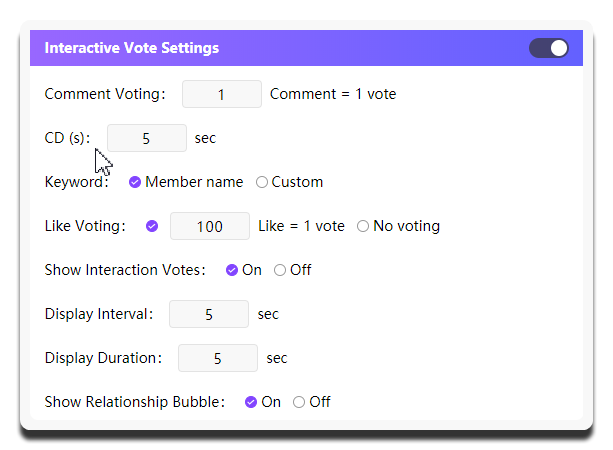
Turn on the switch in the upper-right corner of the configuration panel first. The settings below take effect only after it is enabled.
| Setting | What it does | When to change it | Notes |
|---|---|---|---|
Comment Voting |
Sets how comments are converted into votes | Usually keep it at 1; changing it is generally not recommended |
- |
CD (s) |
Sets the cooldown time for comment vote counting | Adjust it based on how active the live room is | Do not set it too low, or gift value will be heavily diluted |
Keyword |
Controls how viewer comments match to the corresponding Cast Setting entry |
If the nickname in Cast Setting is easy to type, you can use Member name; otherwise, Custom is recommended so you can define easier keywords |
- |
Like Voting |
Sets how likes are converted into votes | Adjust it based on how active the live room is | Do not set it too low, or gift value will be heavily diluted |
Show Interaction Votes |
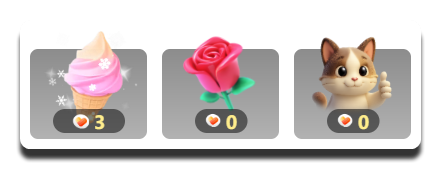
Controls whether interaction vote data is shown separately on the widget | Turn it on when you want viewers to immediately see changes from comment votes and like votes | You can use Display Interval and Display Duration below to control how often it appears and how long it stays on screen; this option only works in Sticker Dance |
Display Interval |
Controls the interval between each appearance of interaction vote data | If the room is extremely active, increasing the interval slightly is usually more stable | - |
Display Duration |
Controls how long interaction vote data stays visible each time | - | If it stays too long, it can reduce the value of gift votes |
Show Relationship Bubble |
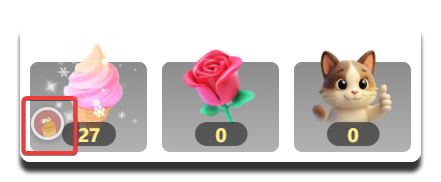
Controls whether to show the interaction bubble between viewer avatars and gift stickers | Turn it on when you want the screen to feel livelier and highlight audience interaction | - |
How interaction vote data looks on the Sticker Dance widget:
Interaction bubbles between viewer avatars and gift stickers: