Ranking Widget Settings
Ranking Widget Settings is a shared module used across multiple gameplay modes to show the real-time ranking of creators or cast members.
Common use cases include:
- Giving viewers a clear sense of the overall ranking, instead of only the current gameplay result
- Showing
MVP Point
This page is for the creator ranking widget. For the audience ranking widget, see User Round Rank Widget.
Setting Details
The following settings take effect only after you turn on the switch in the upper-right corner of the settings panel.
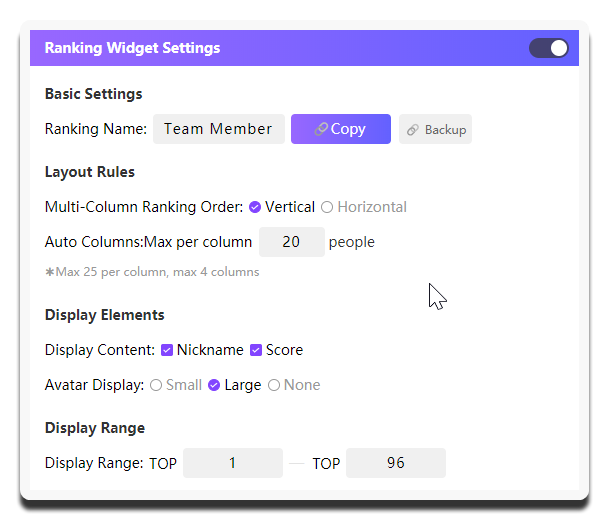
| Setting | What it does | When to change it | Notes |
|---|---|---|---|
Ranking Name |
Sets the title shown at the top of the widget | Change it when you want viewers to understand faster what this ranking represents | Use a short title such as Member Ranking or Session Ranking |
Copy Widget Link |
Copies the current ranking widget URL | Use it to add the widget to your streaming tool after the configuration is confirmed | Copy it after you have finalized the range and display elements to avoid repeated replacement |
Multi-Column Ranking Order |
Vertical is easier to read on vertical layouts, while Horizontal fits wider layouts better |
Adjust it when there are many entries and you need a multi-column layout | Horizontal takes effect only when there are at least 20 data entries |
Automatic Column Split |
Sets how many people can be shown in each column before the system automatically splits into multiple columns | Adjust it when the number of entries changes often and you want the system to handle the layout | Each column can show up to 25 people, with a maximum of 4 columns. Invalid input shows Please enter an integer between 1 and 25 |
Display Content |
Controls which elements appear in the ranking | A common combination is Nickname + Score |
Some gameplay modes support more data fields. Choose based on actual needs |
Avatar Display |
Controls whether avatars use a large icon, small icon, or are hidden | Adjust it when the ranking has many people or the screen is already crowded | When there are many entries, Small or None is recommended |
Display Range |
Determines which range is shown, from TOP n to TOP n |
Adjust it when you want to control the widget length or highlight top ranks | When there are fewer people, TOP 1 - TOP 5 or TOP 10 is common. With more people, you can widen the range, but watch the widget height |
Preview of the Ranking Widget effect:
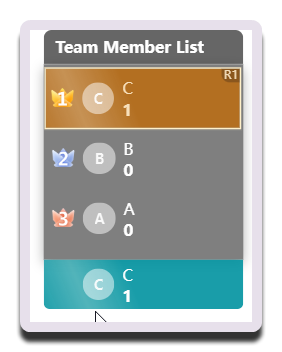
The R1 shown in the upper-right corner of the first-place creator is the effect of enabling round display.
Using it in your streaming tool
You need to copy the standalone link for Ranking Widget Settings and load it separately into your streaming tool.
This design gives you enough flexibility to adjust the layout based on the actual live room setup.