User Round Rank Widget
User Round Rank Widget is used to show the top-ranked viewers in the current round.
If you want to show the cumulative ranking for the whole session, see Ranking Widget Settings.
Setting Details
The following settings take effect only after you turn on the switch in the upper-right corner of the settings panel.
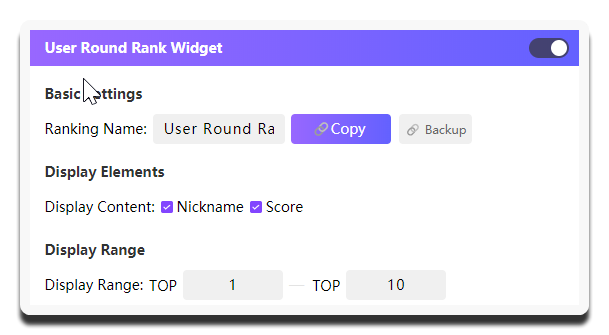
| Setting | What it does | When to change it | Notes |
|---|---|---|---|
Ranking Name |
Sets the title at the top of the widget | Change it when you want viewers to clearly know that this ranking is for the current round | Use a direct title such as Current Round User Ranking |
Copy Widget Link |
Copies the current widget URL | Use it to add the widget to your streaming tool after the configuration is confirmed | It is best to copy it after the display range is finalized to avoid temporary replacements |
Display Content |
Controls which user information appears in the ranking | Adjust it when you want to balance clarity and simplicity | A common combination is Nickname + Score. This module usually does not need too many elements |
Display Range |
Determines which viewers are shown, from TOP 1 to TOP n |
Adjust it when you want to highlight the leaders or avoid an overly long widget | This ranking usually shows only the top 10, with common ranges such as TOP 1 - TOP 5 or TOP 10 |
Preview of the User Round Rank Widget effect:
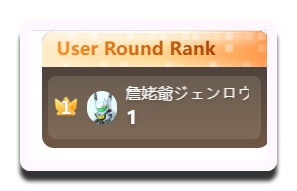
This example shows only the TOP 1 viewer.
Using it in your streaming tool
You need to copy the standalone link for User Round Rank Widget and load it separately into your streaming tool.
This design gives you enough flexibility to adjust the layout based on the actual live room setup.