Freedom Mode
Freedom Mode is the original single-creator rotation mode. If this is your first time configuring Freedom Mode, please skip this page for now and use the Freedom Mode sub-mode under Solo Stage.
Simply put, Freedom Mode lets creators go on stage one by one to collect votes. You can either set a concrete Target Score and count toward it, or count votes directly without setting a target score.
Because only one creator is on stage at a time, all gifts are counted directly.
If this is your first time configuring Freedom, we recommend the following order:
- Make sure you have fully understood Sticker Dance Quickstart
- Create a new preset, choose
Freedom, and confirm that all on-duty cast members have already been added to the current preset - Decide whether this round uses a
Target Score
INDEX
Operation surface: handles display settings, gift rules, and other core optionsInteractive Voting Settings: handles how comments and likes participate in votingCast Setting: handles member configuration
Operation surface
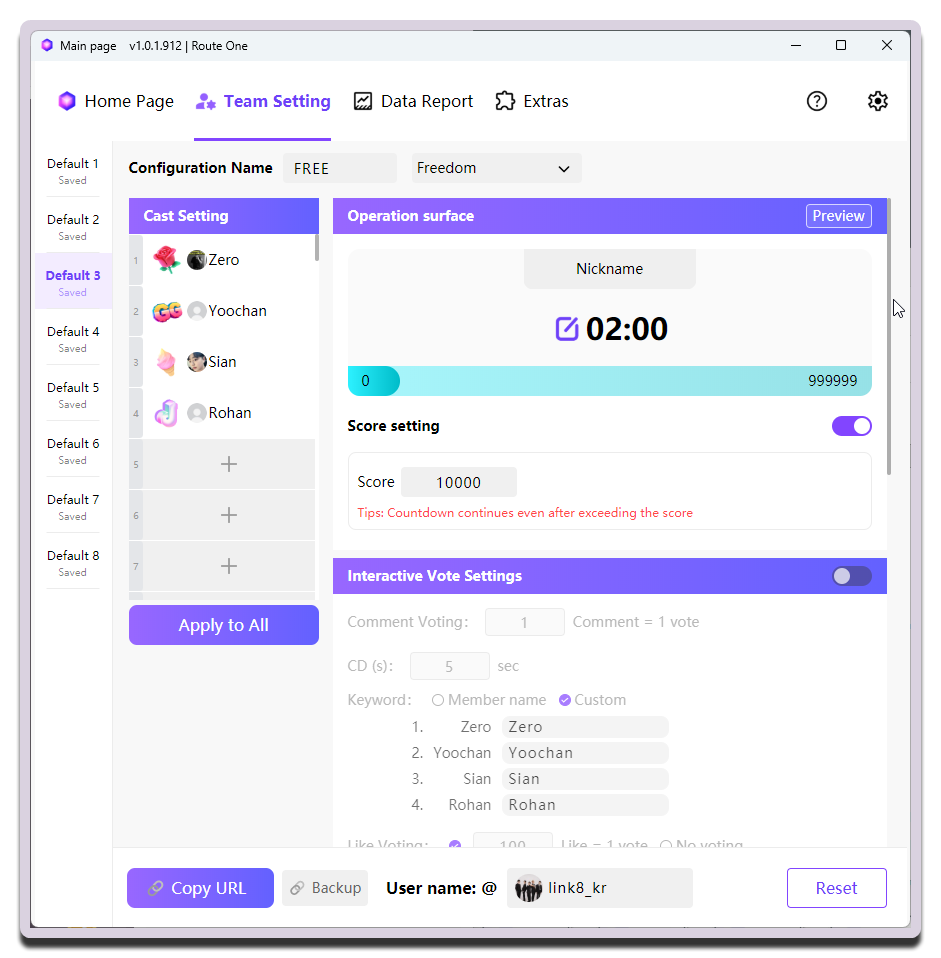
| Setting | What it does | When to change it | Notes |
|---|---|---|---|
Duration (click the edit button to the left of the time area) |
Sets the duration (countdown) | - | - |
Score Settings |
Controls whether the Target Score mechanism is enabled |
After enabling it, you can set the target score with Target Score below |
The target score appears on the right side of the progress bar only after it is enabled |
Target Score
After the target score is reached, the remaining countdown does not end automatically and continues to run.
Interactive Voting Settings
This is useful when a new team has just started streaming or when you want to warm up the live room.
Cast Setting
Configure this according to the cast members who are actually on stage.