Multi PK Mode
Multi PK, also called multiplayer PK, is another variation of Dual Dance. It is suitable for competitive formats where 3 to 5 cast members appear on stage at the same time.
You do not need to master Dual Dance before using Multi PK. Because multiple cast members appear on stage together, the actual feature set is somewhat simpler than Dual Dance.
If this is your first time configuring Multi PK, we recommend following this order:
- Make sure you have fully understood Sticker Dance Quickstart
- Create a new preset, choose
Multi PK, and confirm that all on-duty cast members have already been added to the current preset - Clarify the gift assignment rules first, then continue with the detailed setup
INDEX
You can understand the settings screen in these sections:
- PK Rule Settings: define how many cast members appear on stage at the same time
Operation surface: handles display settings, gift rules, and other core optionsCast Setting: handles member configuration
PK Rule Settings
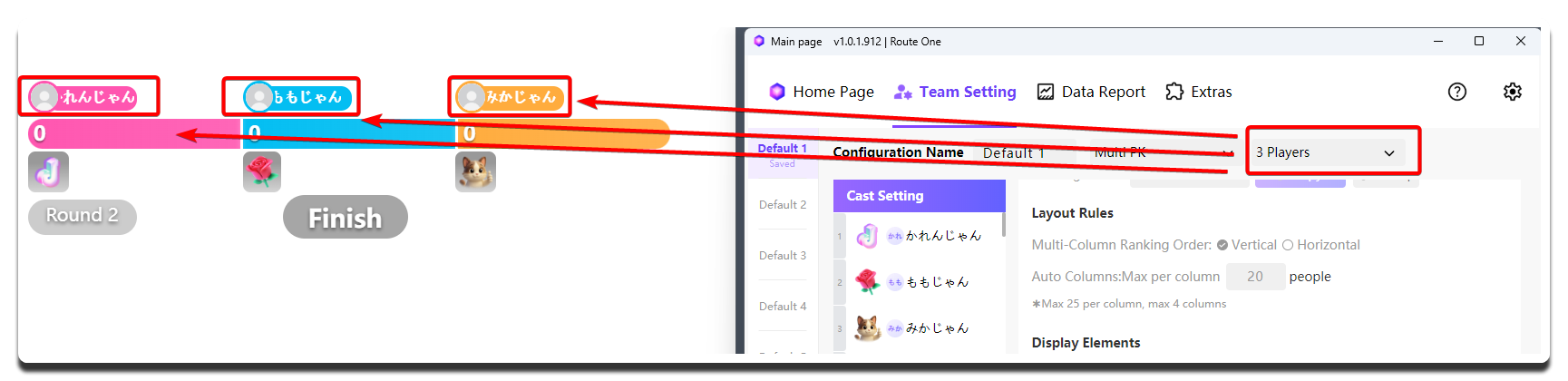
| Setting | What it does | When to change it | Notes |
|---|---|---|---|
| Number of cast members on stage at the same time | Decides how many positions are shown in the widget at the same time | - | If 4 cast members are on duty, you can set it to 4 for all-on-stage, or 3 for one rotating position |
Operation surface
This is the main configuration area of Multi PK. Most core functions are completed here.
Display Settings
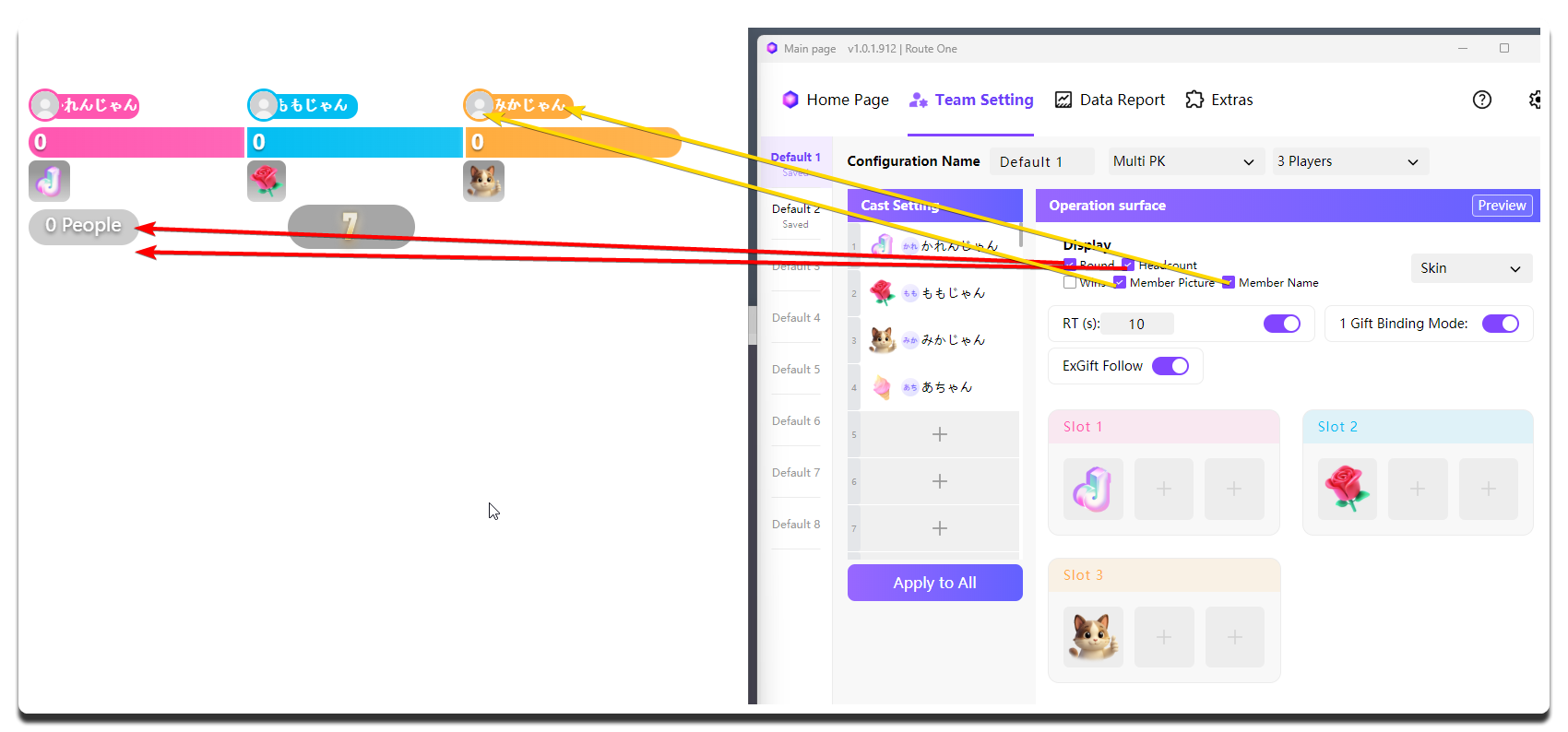
| Setting | What it does | When to change it | Notes |
|---|---|---|---|
Round |
Decides whether the current round number is shown | Enable it if your live flow follows rounds strictly | - |
Headcount |
Shows the number of viewers who sent counting gifts | Enable it when you want to emphasize the crowd atmosphere on stage | Usually left off |
Wins |
- | - | Currently has no effect in Multi PK |
Member Picture |
Explains when user avatars appear on the widget | - | They are shown automatically when there are fewer than 4 positions and top_users data is available; layouts with 4 or more positions do not show this avatar group, and no extra toggle is required |
Member Name |
Controls whether member nicknames are shown | Enable it when you want stronger position recognition | If many people are on stage, it is recommended to enable it together with Member Picture |
Skin |
Changes the appearance style of the Multi PK widget | Change it when you want to adjust the visual style | Not available yet |
Feature Settings
| Setting | What it does | When to change it | Notes |
|---|---|---|---|
RT (s) |
Customizes the duration of each PK round | Adjust it to match your actual pacing | The countdown works only after the switch on the right is enabled |
1 Gift Binding Mode |
Toggles the 1 Gift Binding Mode mechanism | Consider turning it off only when you need a special purpose, such as joining a TikTok designated-gift activity | Recommended to enable together with gift follow |
ExGift Follow |
Toggles gift follow. MCAStar automatically switches the bound gift according to the representative gifts of the cast members currently on stage | Consider turning it off only when you need a special purpose, such as joining a TikTok designated-gift activity | Recommended to enable together with 1 Gift Binding Mode |
| Gift matrix for each camp | Sets the gifts for each camp | Manual selection is needed only when gift follow is not enabled | Each side needs at least 1 camp gift |
Camp Gift Selection Suggestions
If gift follow is not enabled and you set gifts manually, pay attention to the following:
- Try to use gifts with similar value across all sides
- Try to keep the number of gifts for each side consistent
- If you want the rules to stay simple and direct, prioritize
1 Gift Binding Mode
Cast Setting
Configure this according to the cast members who are actually on stage.
Live Operation Notes
-
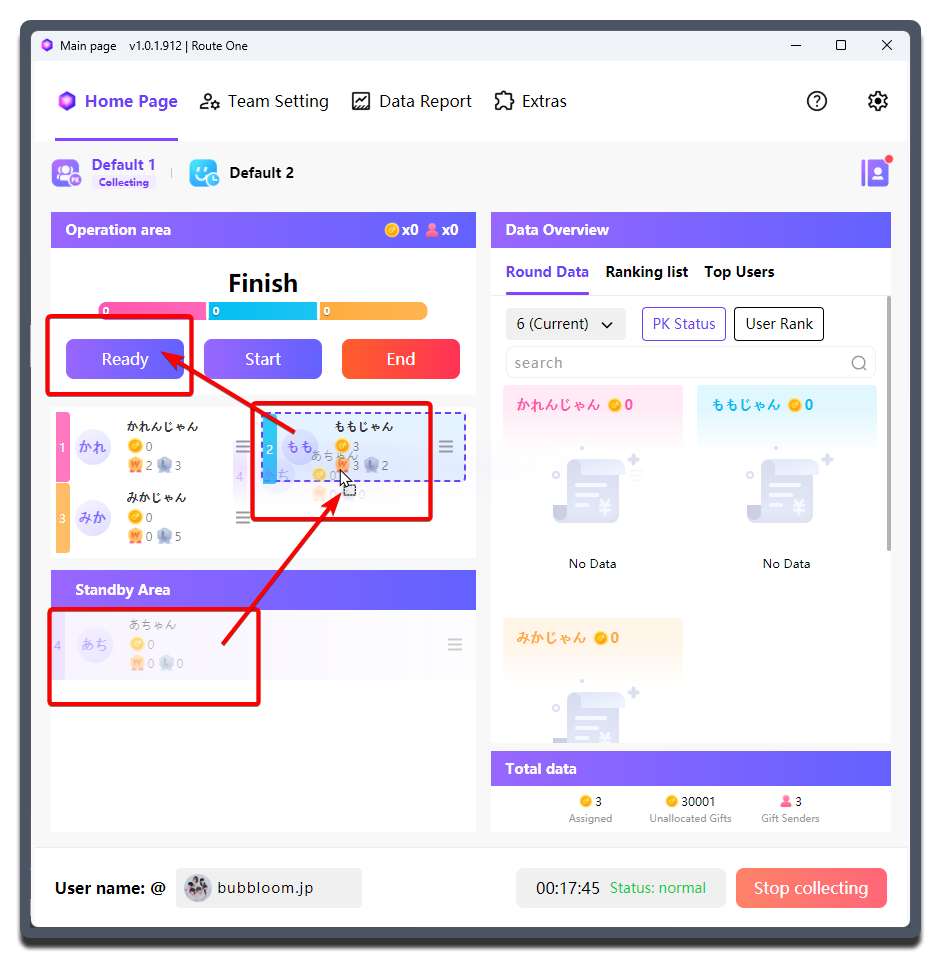
Before the PK starts, the MC / Host can manually drag to sort the cast order.
-
After confirming the order, it is recommended to click
Readyso all viewers can see which cast members will take part in the next PK. -
Then click
Startto officially begin the PK. ClickingStartdirectly also works, butReady->Startusually gives viewers a better experience. -
If you are using rotation in Multi PK, after the countdown ends the MC / Host needs to manually drag to reorder the cast.
-
You can click
Endto finish the current round of PK. After that, repeat more rounds as needed.