Lucky Game
Lucky Game is a display-style wheel widget for drawing prompts, tasks, penalties, mini-games, or any other live interaction that needs a random result.
Overall Layout
By interface function, you can understand Lucky Game as the following three areas:
Wheel Controls: view the current wheel and runStartorQuickWheel Settings: adjust the wheel style and pointer positionContent Settings: switch configurations and fill in the title and options
The left side is the operation area, where you can use it directly during the live session.
The Start button spins the wheel once. The Quick button does the same thing, but with a shorter spinning animation.
The right side is the configuration area. It is recommended to prepare the wheel content you plan to use in advance, because temporary changes can easily interrupt the rhythm.
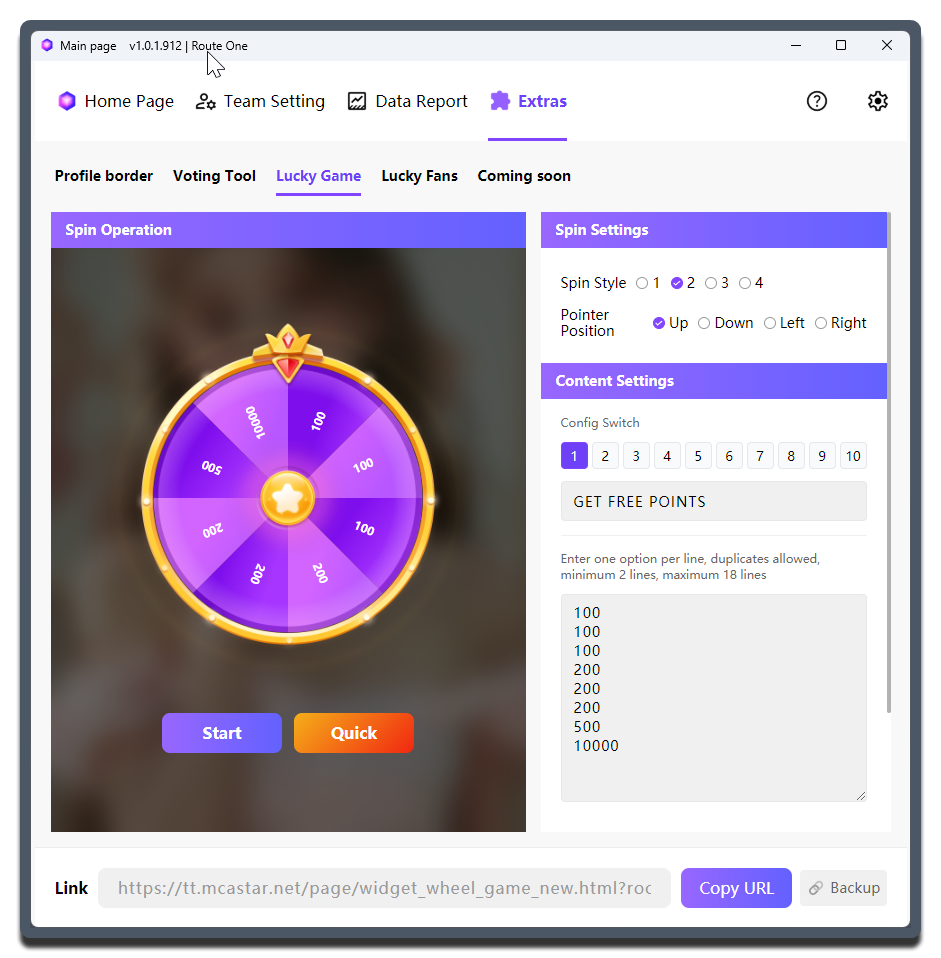
Setting Details
| Setting | What it does | When to change it | Notes |
|---|---|---|---|
Wheel Style |
Selects the skin style of the wheel | - | - |
Pointer Position |
Determines whether the pointer stays on the top, bottom, left, or right side | Adjust it when one side of the live layout already has subtitles, titles, or other widgets | Check it together with the actual browser source position. The default upward direction is not always the best choice |
Configuration Switch |
Quickly switches between different wheel content sets | Use it when one live session needs multiple question banks | Up to 10 configurations can be prepared, which works well for grouping by purpose |
Enter Configuration Title |
What is this draw for? | - | Do not make it too abstract |
| Content input box | One option per line | - | Repeats are allowed. Minimum 2 lines, maximum 18 lines |
Copy URL |
Copies the current widget link | - | - |
How to prepare wheel content
- Keep option names as short as possible so viewers do not have to tilt their heads and read for too long
- Not every scenario needs many options. In most live interactions,
4to8options are enough
Using it in your streaming tool
You need to copy the link for the Lucky Game widget and load it into your streaming tool.
All wheel configurations share one link. When you switch configurations, the content shown in the widget also changes accordingly.
Probability
Every option on the wheel has the same probability.
If you need some options to appear less often, repeat the other options more times.