
Interaction Goal
Interaction Goal is an interaction-goal progress widget that shows real-time progress bars for three goal types — Gift Senders, Likes, and New Followers — in the live frame. Good for gift-unlock pushes, like rushes, follower goals, and any other interaction where viewers sprint toward a target.
The three goal types are independent: you can enable just one, or put all three on screen at the same time.
Overall Layout#
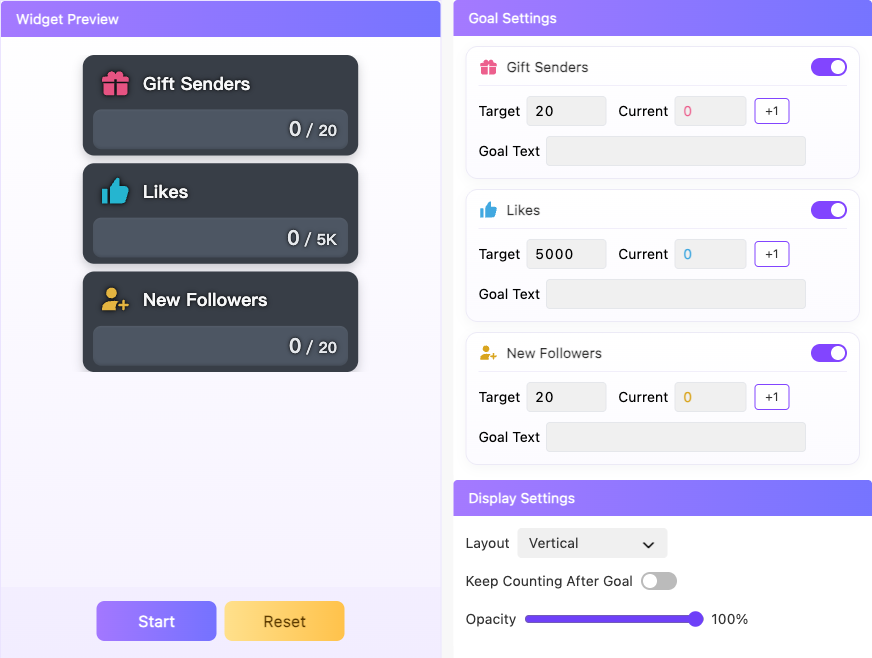
By interface function, you can understand Interaction Goal as the following three areas:
Goal Settings: three goal cards. Each card has its own toggle at the top, with the current value, goal text, and target belowDisplay Settings: layout, opacity, and keep-counting-after-goalWidget Preview: live preview of the widget
The preview on the right refreshes instantly with your configuration. At the bottom, you can copy the widget link.
Goal Types#
| Goal | What is counted |
|---|---|
Gift Senders |
Unique viewers who sent gifts during the current counting period |
Likes |
The total increase in likes received during the current counting period |
New Followers |
Unique new followers during the current counting period |
Setting Details#
Goal Settings (one set per goal type)#
| Setting | What it does | When to change it | Notes |
|---|---|---|---|
| Goal toggle | Enables or disables this goal type | Turn the others off when you only want a single goal type | After a goal is turned off and back on, it restarts counting from 0 |
Current |
Shows and manually adds to the current progress | Manually add when the creator verbally promises "N extra counts" | The +1 button can only add, not subtract |
Goal Text |
The custom text shown on the progress bar | - | Up to 100 characters; can be left empty |
Target |
Sets the target value | - | Must be an integer greater than 0. Like targets are often large, and the widget abbreviates them automatically (e.g. 1.5K) |
Display Settings#
| Setting | What it does | When to change it | Notes |
|---|---|---|---|
Layout |
Vertical stacks the three cards; Horizontal puts them side by side in one row |
Choose based on where your live frame has free space | - |
Opacity |
Adjusts how transparent the card and progress bar backgrounds are | Lower it when you want the widget to blend into the frame | 0-100; text and icons are not affected |
Keep Counting After Goal |
Whether counting continues after the goal is reached | Enable it when you want viewers to see the "overachieved" momentum | Enabled by default; when disabled, values cap at the target |
Run Controls#
| Action | Meaning |
|---|---|
Start |
Starts counting; viewer interactions start driving the progress |
Pause |
Pauses counting; current values are kept |
Reset |
Zeroes all goals and returns to the not-started state |
Version requirement
Using Interaction Goals requires MCAStar client version 1.0.1.957 or later. Older versions do not show the feature entry.
Using it in your streaming tool
You need to copy the widget link for Interaction Goal and load it into your streaming tool.
Viewer gifts, likes, and follows push the widget progress in real time; no manual refresh is needed.